For a while, our team kept hitting the same bottleneck. Every bug or feature report that came through Slack had to be logged into Jira by hand. Someone had to read the whole thread, work out what was actually being reported, and write it up. Often a developer had to stop what they were doing, sit with the issue, and decide whether it was even worth filing. It was slow, repetitive, and it pulled people off real work.
So I built a bot to take that off our plates. The thinking runs on a Claude routine, wired into Slack and Jira so that a reaction goes in and a ticket and a thread reply come out.
Now the whole thing collapses into one gesture. You react to a Slack message with an emoji. A couple of minutes later there is a finished Jira ticket, and the bot has replied in the thread with a link to it. No tab-switching, no write-up, and nobody has to drop what they are doing to triage it.
The idea in one line
One reaction does the whole job. An AI reads the thread, files the right kind of Jira ticket, and replies in the thread with a link.
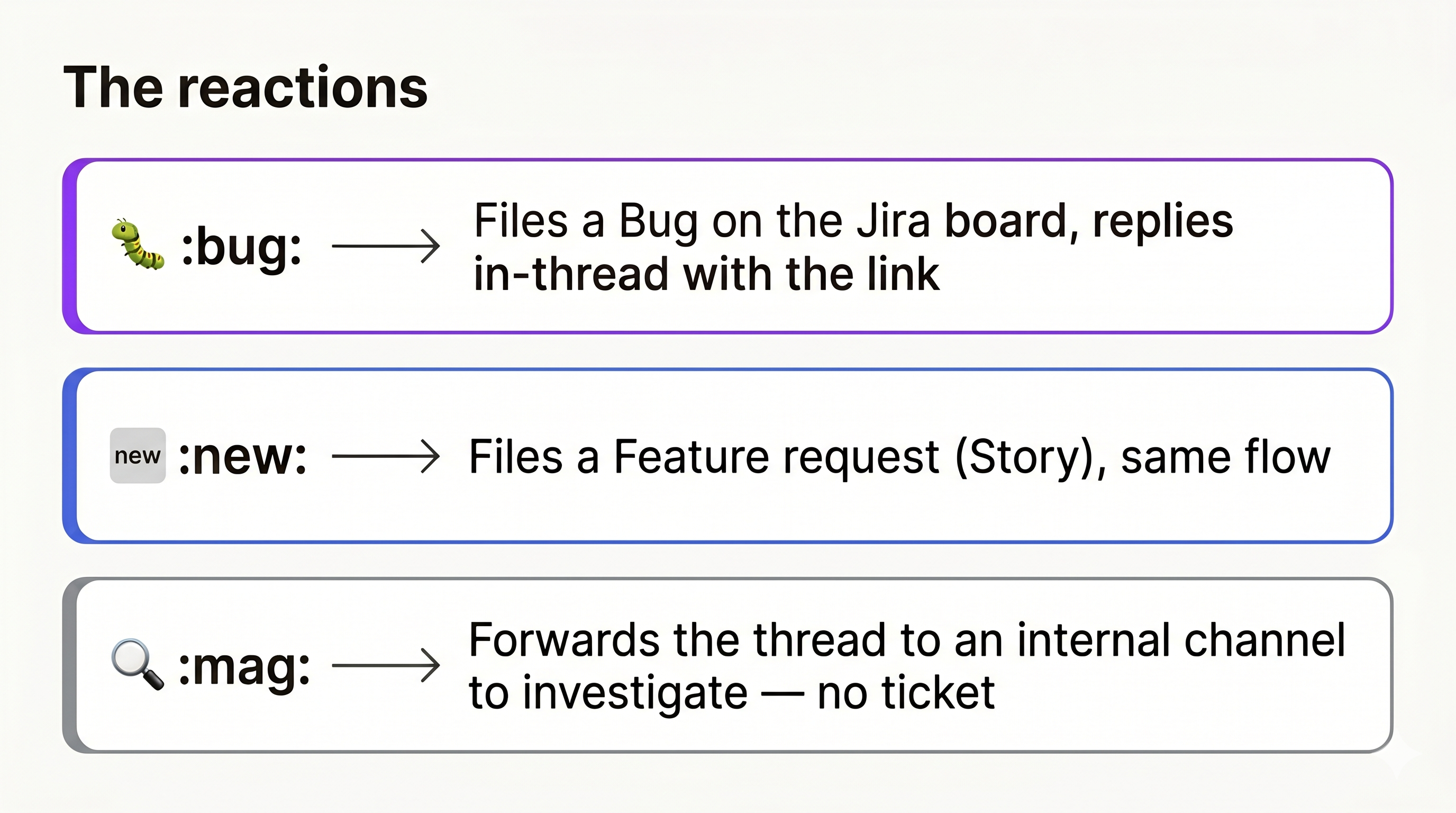
There are three reactions, and each does something different:
| Reaction | What happens |
|---|---|
🐛 :bug: | Files a Bug and replies in the thread with the link |
🆕 :new: | Files a feature request, same flow |
🔍 :mag: | Forwards the thread to an internal channel to triage first, no ticket yet |
The emoji is the interface, and that is the point. The action has to be cheaper than not doing it, or people will not bother.
The architecture
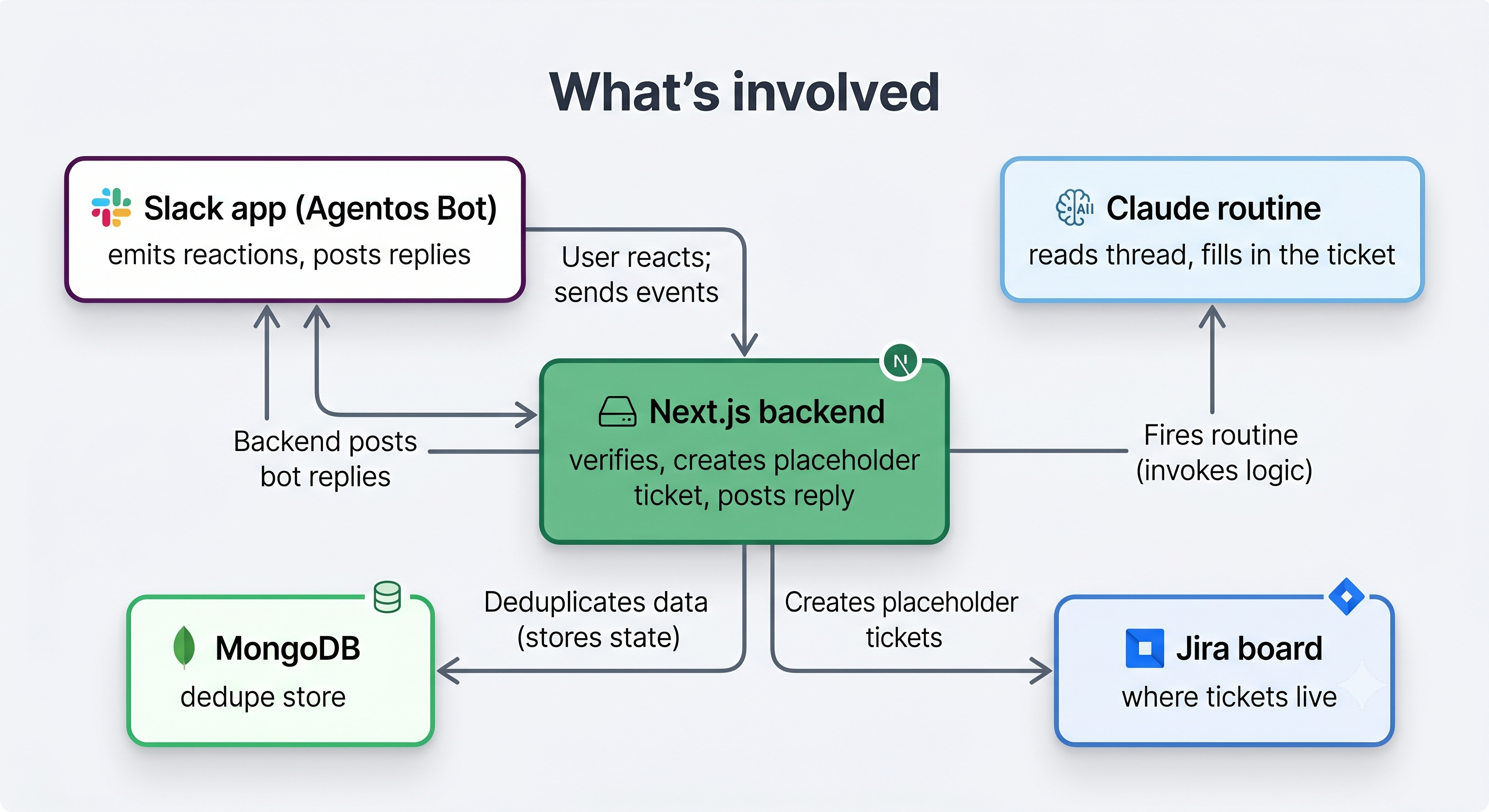
The moving parts are deliberately boring. The only clever bit lives in one place.
- Slack sends an event the moment someone adds a reaction.
- A small Next.js backend receives it.
- The backend does three quick things. It checks the request really came from Slack, checks it has not already handled this exact reaction, and creates a placeholder Jira ticket so there is something to point at right away.
- It kicks off a Claude routine and returns a
200to Slack, all within a couple of seconds. - The routine reads the whole thread, writes a real summary, sets a priority, adds labels, finds the reporter, and updates the placeholder ticket.
- A short timer fires, and the backend posts the reply into the Slack thread.
Splitting "create a placeholder now" from "fill it in a moment later" is what makes the bot feel instant while it is still doing real work.
Why Next.js, and the endpoints behind it
The bot is mostly a set of webhooks, so it did not need a heavy framework. Next.js API routes gave me HTTP endpoints, a build, and a deploy target in one project, without standing up a separate server. The same app also serves a small dashboard for the team, so keeping the API and the UI together meant I only had one thing to run and deploy.
Here is what I ended up building:
POST /api/slack/eventsis the main webhook. Slack hits it on every reaction. It verifies the signature, drops duplicates, creates the placeholder ticket, starts the routine and the timer, and returns a 200.POST /api/finalize-replyis the callback the timer hits about two minutes later. By then the ticket is filled in, so this route reads it and posts the reply into the thread.GET /api/ticketsbacks the dashboard. It lists recent reactions and their tickets, pulling live status and assignee straight from Jira so the board stays the source of truth.POST /api/tickets/notifylets an admin re-ping a reporter with the ticket's current status, on demand./api/auth/*and/api/usershandle dashboard login and managing who has access./api/test-automationis a dev-only route I used to wire up the timer. It sends a sample payload shaped exactly like a real reaction, so I could test the callback without spamming Slack.
Only the first two matter to the core flow. The rest grew out of running the thing day to day.
Why there is a database, and what else would work
The bot has to remember things between requests, so it needs somewhere to write them down. There are two reasons it needs that memory.
The first is deduplication. Slack retries events, and people pile reactions onto a busy thread, so the same reaction can arrive several times. I store a fingerprint of each one I have handled and ignore the repeats. Without that, one popular bug report turns into five identical tickets.
The second is the dashboard. The team wants to see what has come through and what state each ticket is in, so I keep a record of every reaction and the ticket it produced.
I used MongoDB because the data is just loose documents (a reaction, a ticket id, a timestamp) and the shape kept changing while I built it. A document store let me change that shape without writing migrations, and the official driver works cleanly inside Next.js routes.
It is not the only option. Firebase (Firestore) would do the same job and throw in hosting and auth, which helps if you do not already have a backend. A plain Postgres table would work just as well, and probably better once the data settles into a fixed shape. For something this small you could even lean on Redis, since the dedup records do not need to live forever. The brand does not really matter. You need a small amount of state that survives between requests, and almost any database covers that.
The four things that actually mattered
If you build something like this, these are the lessons that cost me the most time.
1. Verify the signature on the raw request body
Slack signs every request with an HMAC. The catch is that if your framework parses the JSON body before you check the signature, the bytes change and it never matches. You have to run the HMAC over the exact raw bytes Slack sent, before anything touches them. It is one of the most common reasons a Slack bot will not authenticate, and it is hard to spot because the payload looks identical either way.
2. Return a 200 within about three seconds
Slack wants a fast acknowledgement. If you do all the work inline, calling the AI, waiting on Jira, posting the reply, you will blow past the limit. Slack assumes you failed and resends the event, and now you have duplicates. The fix is structural. Do the instant work inline (verify, dedupe, placeholder), acknowledge, and push everything slow into the background.
3. Deduplicate, or you will file the same ticket twice
Between Slack's retries and people stacking reactions on a hot thread, the same event shows up more than once. I store a fingerprint of each handled reaction and drop the repeats. Skip this and a popular bug report becomes five identical Jira tickets.
4. Give the agent one job
My first instinct was to let the routine do everything: read the thread, file the ticket, and post the reply. That turned out to be the wrong split, and it is where the most interesting problem showed up.
The part I did not expect: why there is a timer
The routine runs in a sandbox with restricted network access. It can reach Jira, but it cannot call the Slack API to post a message. I could have tried to open that path. Instead I worked with it.
So the routine does one thing: update the Jira ticket. It never touches Slack. The backend, which can talk to Slack, starts a short timer (about two minutes) when the reaction first lands. When the timer fires, the backend reads the finished ticket and posts the reply itself.
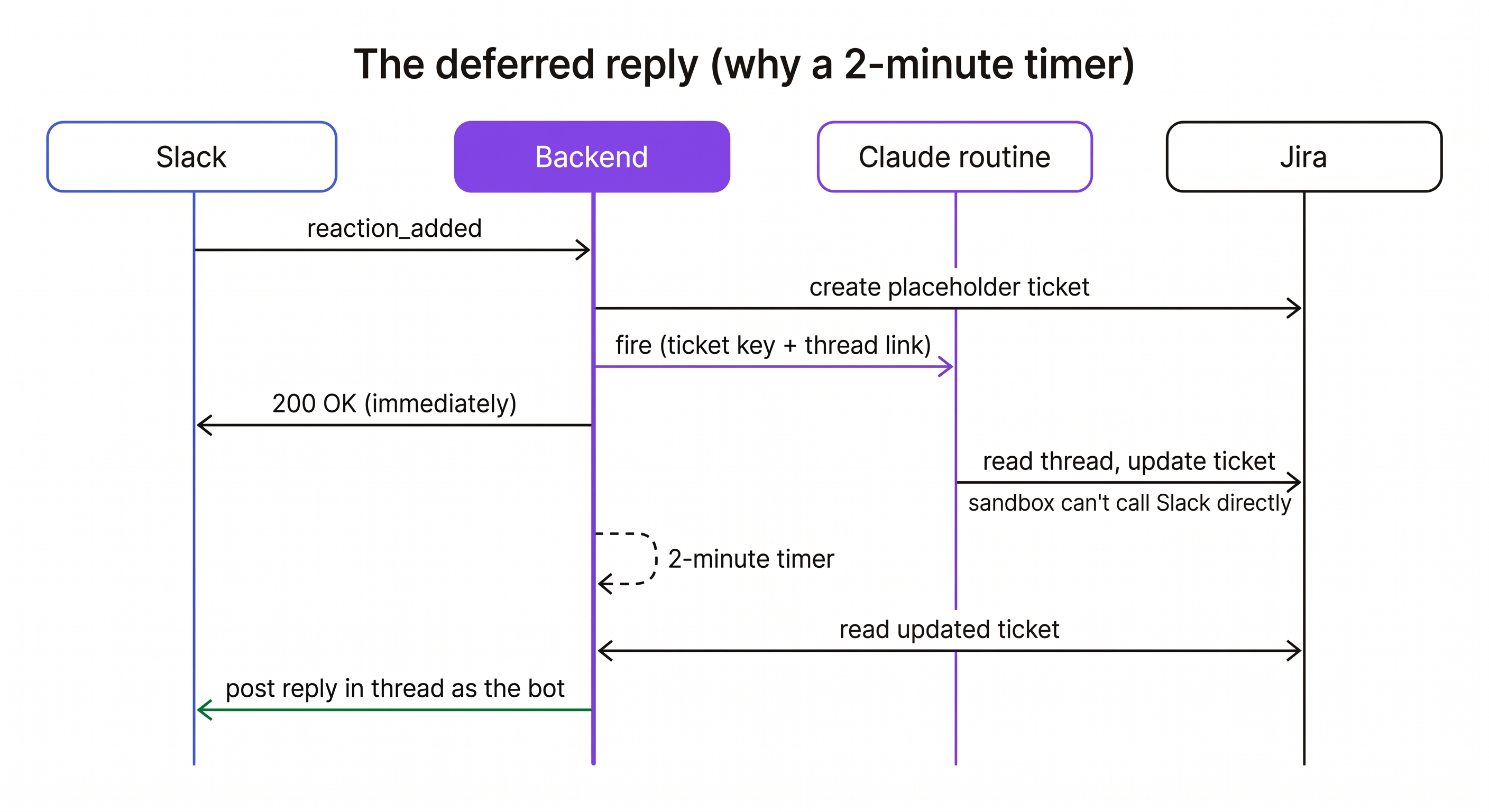
That two-minute gap is not padding. It is the time the routine needs to finish, so the reply reflects the real, filled-in ticket instead of a half-written placeholder. A limit I would have called a blocker ended up giving me a cleaner split: the routine writes, the backend talks.
If your AI agents run in a locked-down sandbox, and more of them do now for good reasons, assume they cannot reach everything and build the rest of the system to cover for them.
What I would tell someone starting out
- Keep the trigger cheap. An emoji beats a slash command, which beats a form. The less effort it takes, the more it gets used.
- Put a placeholder in front of the slow work. People forgive "still filling in" far more than a screen where nothing happens.
- Keep the smart part in one place. One AI step that does one job is easy to prompt, debug, and reason about. Spread it across five and you have five things that can break.
- Treat platform limits as part of the design. The three-second rule and the sandbox both made this better once I stopped fighting them.
The goal was never to show off the AI. It was to make the bot disappear into the work, so you react and the ticket just shows up. That was the bar.
Where this goes next
Strip away the specifics and you are left with a pattern: a cheap trigger, an AI that reads the surrounding context, an action in another system, and a reply back where the work started. Bug-to-Jira is just the first thing I pointed it at. The same shape fits a lot of other problems.
- Incident response: react on an alert thread and it drafts the postmortem skeleton, with the timeline already pulled from the messages.
- Customer feedback: a reaction routes a thread to the right place, whether that is a Linear issue, a Notion doc, or a CRM note, tagged and summarized.
- Code review: react on a "can someone look at this" message and it opens the PR, summarizes the diff, and pings the right person.
- Follow-ups: turn a "we should circle back to this customer" thread into a scheduled task with the context attached.
The trigger does not have to be an emoji, and the destination does not have to be Jira. Swap either end and the middle stays the same: read the context, do the slow work out of band, report back.
I am curious where you would point this. What repetitive, context-heavy task on your team would you wire up this way? Leave it in the comments, and if there is a good one I will write up how I would build it.